
 James Montemagno
b117c7b1c1
Initial Commit
James Montemagno
b117c7b1c1
Initial Commit
|
преди 11 години | |
|---|---|---|
| .. | ||
| AndroidPlayerMiniHack | преди 11 години | |
| Images | преди 11 години | |
| AndroidPlayerMiniHack.sln | преди 11 години | |
| AndroidPlayerMiniHack.userprefs | преди 11 години | |
| README.md | преди 11 години | |
README.md
Lab: Xamarin Android Player

Challenge
Test out the brand new high performance Xamarin Android Player for Mac or PC.
Walkthrough
Download Xamarin Android Player for Mac or PC from xamarin.com/android-player
Launch Xamarin Android Player
Open AndroidPlayerMiniHack.sln in Visual Studio or Xamarin Studio
Select Xamarin Android Player as Target
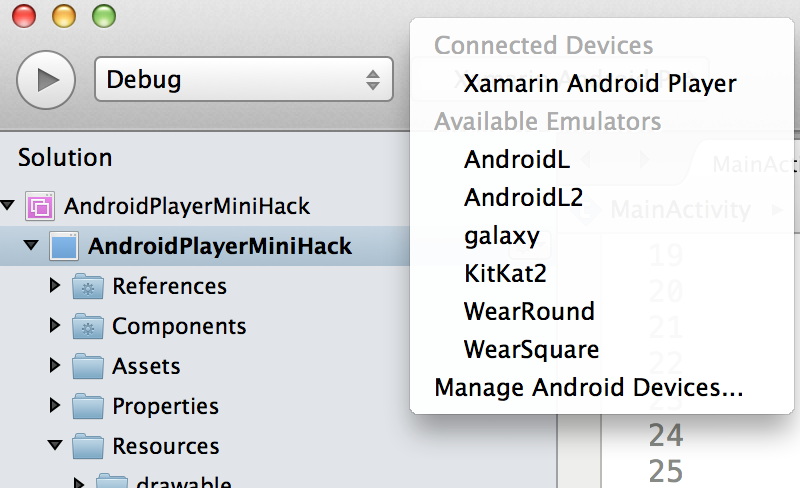
Ensure NuGet Packages are installed (Right Click on Solution and Restore Packages in Xamarin Studio or Select Manage NuGet Packages in Visual Studio)
Debug application
Click Xamarin Android Player Logo
Click Battery Tab

Change Battery Level
Select Refresh Battery
Bonus: Get GPS Location
Add NuGet Package: “Geolocator Plugin for Xamarin and Windows”

Add Geolocator Permissions: You must request
ACCESS_COARSE_LOCATION&ACCESS_FINE_LOCATIONpermission. These can be added under the project settings.Add new TextView and Button in Resources/layout/main.xml
Find Views and add click handler to button
Get location and update view with Geolocator Plugin at the end of OnCreate() in MainActivity.cs